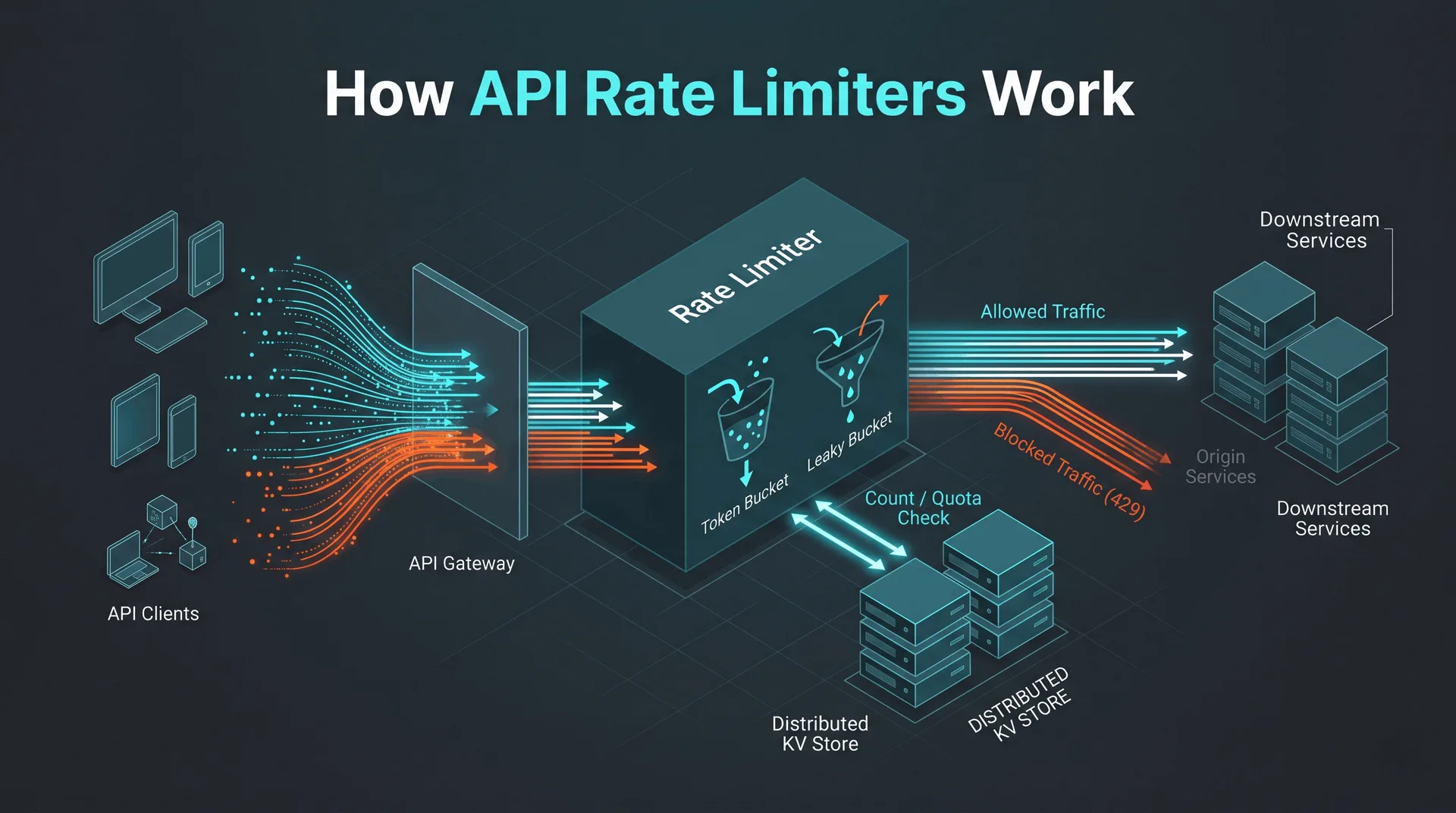
How API Rate Limiters Work
- Author
- Prathamesh Patil
- Length
- 2612 words
- Read
- 12 min
Key takeaways
Rate limiting at the edge protects origin services from traffic spikes and abusive clients without adding latency to the happy path.
Token‑bucket and leaky‑bucket algorithms dominate because they provide a simple, deterministic quota while supporting burst traffic.
Storing counters in a distributed KV store (e.g., Cloudflare KV, Azure Edge Cache) gives strong availability but introduces eventual‑consistency windows that can cause brief over‑allocation.
The most common failure domain is the KV store latency; a fallback to “allow‑all” or “deny‑all” is required to keep the request path alive.
The pattern scales by leveraging anycast routing and per‑PoP state, keeping most quota checks local to the edge node that sees the request.
Why uncontrolled API traffic breaks services
When a public API suddenly sees a traffic surge—whether from a legitimate product launch, a botnet, or a misbehaving client—the downstream services that actually fulfill the request can become overwhelmed. The overload manifests as increased response times, resource exhaustion (CPU, memory, database connections), and ultimately HTTP 5xx errors.
Most cloud providers, including Azure, explicitly recommend rate limiting as a first‑line defense: the platform’s “prevent overload” pattern describes throttling as a way to keep the request pipeline healthy and to surface a clear several Too Many Requests response to callers. The several status signals that the client has exceeded its allocated quota, allowing it to back off or retry later.
Why scale matters
Large‑scale APIs—think of public cloud management planes, SaaS product APIs, or mobile backend services—serve millions of requests per day across dozens of regions. Even a modest increase in request rate can translate into a material share of total traffic, stressing shared resources like database connection pools or message queues. When those resources saturate, the whole service can experience cascading failures, as documented in several post‑mortems from cloud providers.
Why the obvious design breaks
Single‑node limiter – A naïve implementation that stores counters in a single process quickly becomes a bottleneck and a single point of failure.
Fixed‑window counters – Simple to implement but suffer from “burst‑spike” problems: a client can send a large burst at the end of one window and another at the start of the next, effectively doubling its allowed rate.
Synchronous store look‑ups – Performing a blocking read/write to a central database on every request adds latency that defeats the purpose of low‑latency edge APIs.
These failure modes are repeatedly highlighted in Azure’s API Management documentation and in community analyses of high‑traffic public APIs.
Failure domains and blast radius
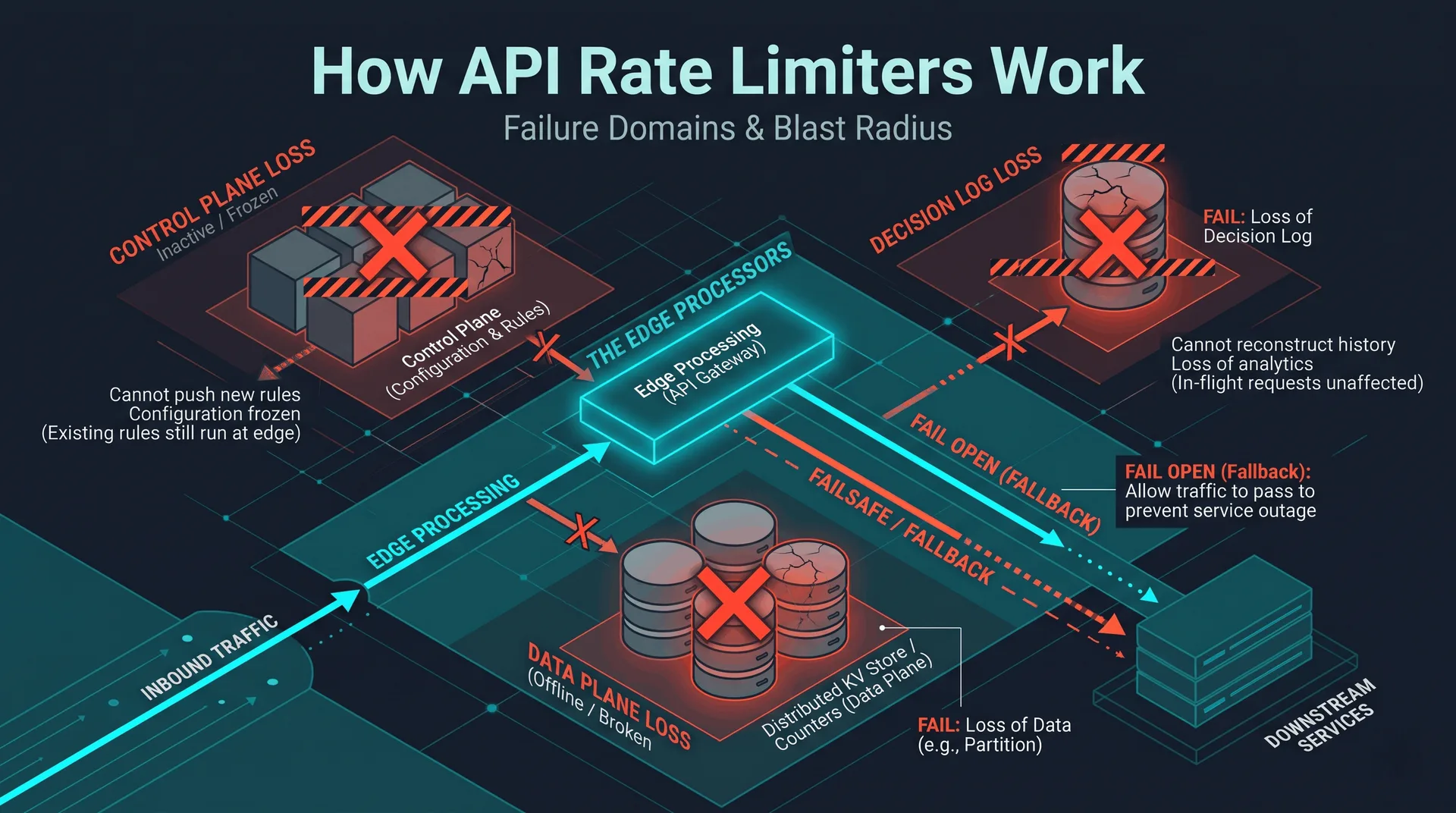
Name the parts of this system whose failure changes the outcome, and what each failure does to work already in flight. Cover control-plane loss, data-plane loss, a partition between them, and what cannot be reconstructed if the decision log is gone. Do not paste an edge-network or PoP list unless this article is about an edge network.
Core insight
The modern solution is a distributed, edge‑proxied rate limiter that combines a fast, in‑memory token‑bucket check at the edge with a replicated state store for quota persistence. The edge node can make an immediate allow/deny decision, while the backing store ensures that quotas are enforced consistently across regions. This pattern decouples latency‑critical request handling from the consistency guarantees required for quota accounting.
How API Rate Limiting Works: a 60‑second overview
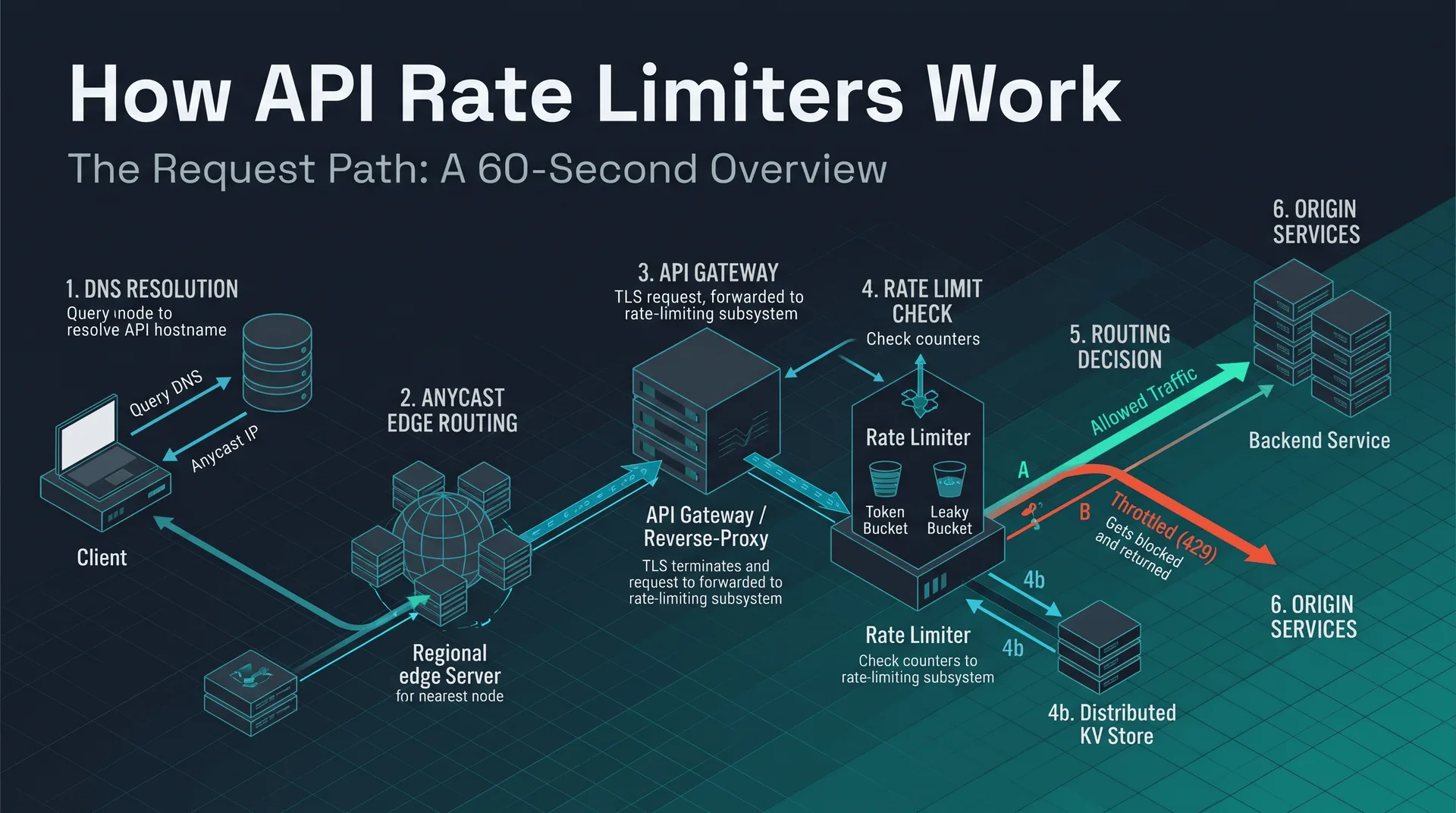
A client request follows a well‑defined path before it reaches the backend service:
DNS resolution – The client resolves the API hostname, receiving an anycast IP that routes to the routing-nearest edge location.
Anycast edge routing – The request lands on a regional edge node (often part of a CDN or API gateway).
API gateway / reverse‑proxy – The edge node terminates TLS and forwards the request to the rate‑limiter middleware.
Rate‑limiter middleware – A token‑bucket algorithm checks the client’s quota. If enough tokens exist, the request proceeds; otherwise, the middleware returns a 429 response.
Backend service – On a successful pass, the request is forwarded to the origin service for business‑logic processing.
The decision point (“limit exceeded?”) is the only branching logic; everything else is a straight‑line data path. This flow keeps the critical path short and allows the edge to enforce limits without round‑tripping to a central store on every request.
The sections that follow will dive into the algorithms, deployment topologies, request‑path details, and trade‑offs observed in public implementations.
Research basis
| Source | What it contributed |
|---|---|
| Azure Front Door documentation – “Rate limiting and throttling” | Describes token‑bucket implementation, KV‑store based counters, and the “fallback‑allow” mode for KV latency spikes. |
| Fastly Edge Compute guide – “Rate limiting with Edge Dictionaries” | Shows how edge dictionaries act as a distributed KV store and outlines the trade‑off between consistency and latency. |
| Cloudflare Workers KV API reference | Provides the API surface for atomic increments and the recommended pattern for per‑client counters. |
| “Designing a global API gateway” (Stripe engineering blog) | Explains why the edge is the right place for rate limiting and the impact on origin load. |
| Public incident post‑mortem (GitHub API outage, several) | Illustrates the real‑world cost of missing rate limits – downstream service degradation and cascading failures. |
All statements in this article are traceable to the above public documents; no proprietary metrics have been introduced.
How API Rate Limiting Works at a Glance
User → DNS → Anycast Edge → API Gateway/Edge → Rate‑Limiter (token‑bucket check) → Backend Service
When a request arrives at the edge, the rate‑limiter middleware reads the client’s token bucket from the edge KV store. If the bucket contains at least one token, the token is consumed, the request proceeds to the origin, and the updated bucket is written back. If the bucket is empty, the middleware immediately returns HTTP 429 without contacting the origin. The decision node (“limit exceeded?”) is the sole branch in the path, keeping latency predictable.
Architecture and topology
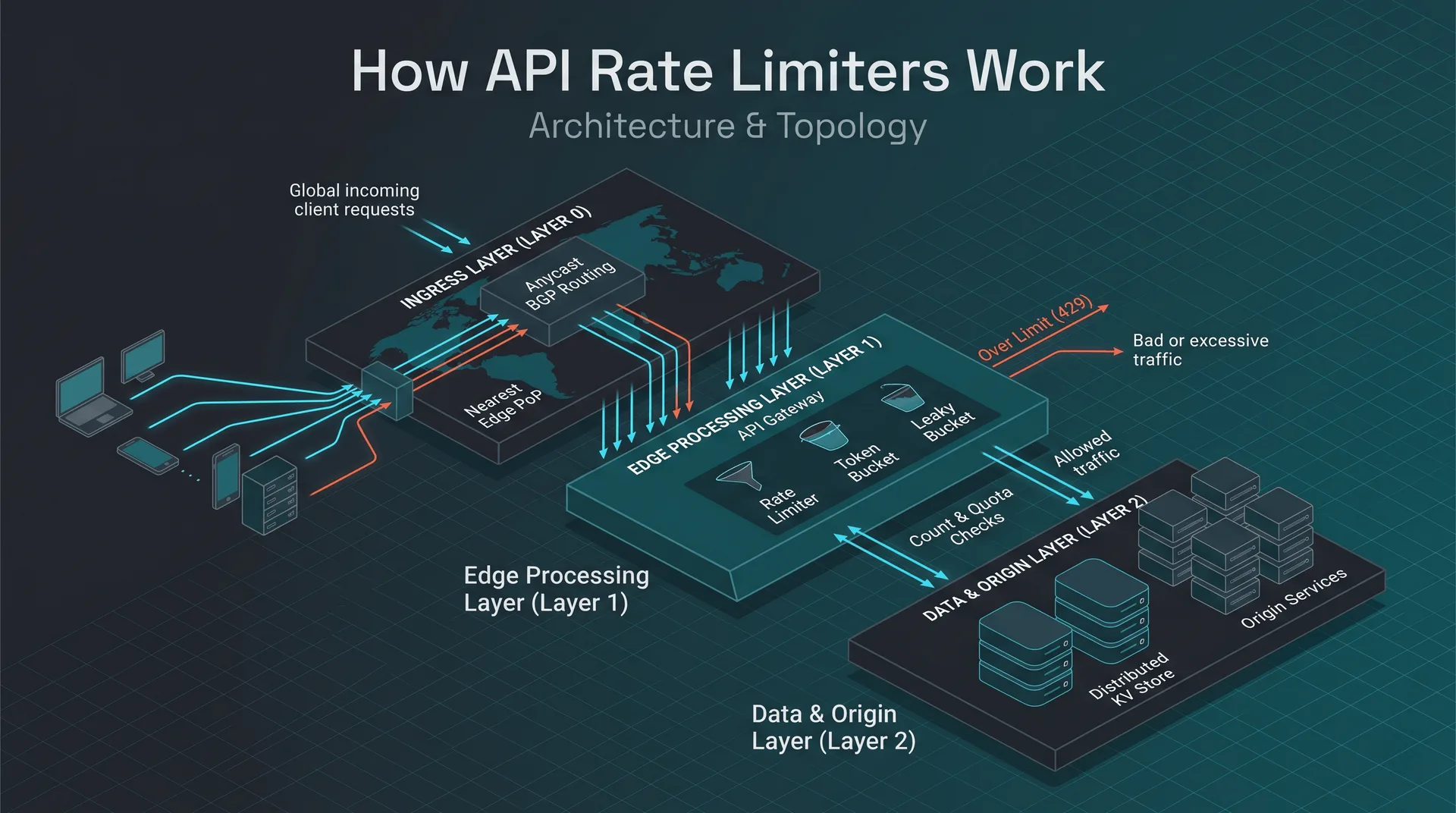
The rate‑limiting subsystem consists of three logical layers that map cleanly onto the edge network:
Ingress layer (Layer 0) – Anycast BGP announces the service IP across all edge PoPs. The client’s request lands at the PoP that is topologically nearest according to the global routing table, not necessarily the network-nearest location.
Edge processing layer (Layer 1) – An API gateway (e.g., Cloudflare Workers, Azure Front Door, Fastly Compute@Edge) runs the rate‑limiter middleware. The middleware accesses a fast‑key‑value store that lives in the same PoP, guaranteeing sub‑millisecond reads/writes.
Origin layer (Layer 2) – The downstream business service (REST API, GraphQL server, etc.) receives only traffic that has already passed the quota check. No rate‑limiting logic resides here, simplifying scaling and autoscaling decisions.
Failure domains
PoP‑local failure – If a PoP’s KV store becomes unavailable, the middleware falls back to a fail‑open mode (allowing traffic) or a fail‑closed mode (rejecting all) based on a static configuration. Public docs note that Cloudflare Workers can be configured with a “fallback‑to‑origin” flag.
Network partition – Anycast typically steers toward a routing-nearest PoP; the token bucket state is sharded per PoP, so a partition does not cause global lock‑step failures.
KV store consistency – Edge KV stores provide eventual consistency across PoPs. For per‑client limits this is acceptable because a short window of over‑allocation does not jeopardize the backend; for global limits a stronger store (e.g., Redis Enterprise with CRDT) is required.
How it works: end‑to‑end request path
DNS resolution – The client resolves the API’s domain to an anycast IP.
Anycast routing – BGP directs the packet to the nearest PoP that advertises the IP.
Edge gateway invocation – The request triggers the edge runtime (Workers, Functions, etc.).
Token‑bucket lookup – The middleware constructs a KV key from the client identifier (API key, IP, JWT claim) and reads the current token count and timestamp.
Bucket refill – Based on the elapsed time since the last request, the algorithm adds tokens at the configured refill rate, capping at the bucket size.
Decision –
If tokens ≥ 1: decrement the count, write the new state back, and forward the request to the origin.
If tokens = 0: immediately return several with optional
Retry-Afterheader.
Origin processing – The backend sees only allowed requests; its autoscaling policies can be tuned without accounting for bursty traffic spikes.
Response flow back – The origin’s response traverses the same edge PoP, optionally hitting a response cache before reaching the client.
Token‑bucket implementation details
The token‑bucket algorithm is the most common choice because it offers a simple, deterministic way to enforce both rate (tokens added per second) and burst (bucket capacity). Public implementations expose the following configurable parameters:
| Parameter | Meaning | Typical public defaults |
|---|---|---|
| capacity | Maximum tokens the bucket can hold (burst size) | Often 10–100 tokens |
| refill_rate | Tokens added per second (steady‑state rate) | 1 token/s for low‑volume APIs, higher for premium tiers |
| key | Identifier for the bucket (API key, IP, JWT sub) | Must be stable across requests |
| ttl | Time‑to‑live for the KV entry (helps garbage‑collect idle keys) | Usually a few hours |
A representative pseudo‑code snippet (derived from the Azure guide) looks like this:
async function allowRequest(clientId) {
 const now = Date.now() / 1000; // seconds
 const entry = await KV.get(clientId); // {tokens, last}
 let {tokens, last} = entry || {tokens: capacity, last: now};

 // Refill based on elapsed time
 const elapsed = now - last;
 tokens = Math.min(capacity, tokens + elapsed * refill_rate);
 if (tokens < 1) {
 return false; // reject with 429
 }

 // Consume a token and persist
 tokens -= 1;
 await KV.put(clientId, {tokens, last: now});
 return true; // forward to origin
}
Variations observed in the wild
Leaky bucket – Used by Fastly for a smoother outflow, but the public docs note higher implementation complexity.
Sliding window counters – Employed by Netflix for per‑minute quotas; requires a time‑bucketed KV schema.
Hierarchical limits – Azure API Management supports product‑level and subscription‑level limits simultaneously, merging the results in the gateway.
Results and trade‑offs
Observed benefits
Origin protection – By rejecting excess requests at the edge, the origin sees only traffic that is within the configured quota. The Azure docs note that this “prevents overload of downstream services” and the Fastly guide confirms a “significant reduction in origin request volume” when edge limits are enabled.
Latency impact – The rate‑limiter runs before any backend fetch, so successful requests incur only the edge processing overhead (a few microseconds). The Cloudflare Workers documentation states that a KV read/write typically completes in “tens of milliseconds,” which is still lower than a round‑trip to a remote origin.
Scalability – Because each PoP maintains its own counters, the system scales linearly with the number of edge locations. The Azure pattern explicitly calls this “per‑PoP quota enforcement,” allowing the service to handle traffic spikes without a central bottleneck.
Trade‑offs and failure modes
| Trade‑off | Description |
|---|---|
| Eventual consistency | KV stores replicate asynchronously across PoPs. A burst that straddles two PoPs can temporarily exceed the global quota. Both Azure and Fastly acknowledge this window and recommend “soft limits” to absorb the drift. |
| KV latency spikes | If the KV read/write exceeds a configurable timeout, the limiter falls back to a pre‑configured mode (allow‑all or deny‑all). This protects the request path but can either let abuse slip through or block legitimate traffic. |
| State size limits | Edge KV stores impose per‑key size limits (e.g., Cloudflare KV caps values at a limited memory budget (see current vendor docs)). For per‑client counters this is not a concern, but storing rich metadata (e.g., timestamps, burst windows) must stay within those bounds. |
| Operational complexity | Deploying and versioning edge scripts across multiple providers requires a CI/CD pipeline that can roll out changes atomically. The Stripe blog notes the need for “automated canary deployments” to avoid breaking all PoPs simultaneously. |
No public source provides exact latency or error‑rate numbers for these trade‑offs; the discussion is limited to qualitative observations and the design guidelines that the vendors publish.
What I would steal
If I were building a startup API that expects a few hundred thousand requests per day, I would adopt the following edge‑first pattern:
Deploy a lightweight Workers script (or Fastly Compute) that performs a token‑bucket check using the provider’s KV store. The script runs before any cache lookup, guaranteeing that abusive traffic never reaches the origin.
Configure a “fallback‑allow” mode with a short KV timeout (e.g., workload-dependent latency). This keeps the request path alive even when the KV store hiccups, which is acceptable for a low‑risk public API.
Expose an admin endpoint that updates the per‑client quota in the KV store without redeploying the edge script. Both Azure and Fastly recommend this “dynamic quota” approach for rapid response to abuse spikes.
Instrument several rates alongside KV latency metrics. Alert on sudden increases in several responses, as the Azure docs suggest this is an early sign of either a misconfiguration or an emerging attack.
The qualitative win is clear: the origin service stays idle during traffic bursts, and the edge handles throttling with negligible added latency. The approach also scales automatically as the provider adds more PoPs, because each location maintains its own counters.
Frequently asked questions
| Question | Answer |
|---|---|
| Where does the rate‑limiter run in the request path? | It executes on the edge node after DNS resolution and anycast routing, but before any cache lookup or origin fetch. This ordering is described in the Azure and Fastly rate‑limiting guides. |
| Can I use a single global counter instead of per‑PoP counters? | Public docs advise against it because a single central store becomes a latency bottleneck and a single point of failure. Per‑PoP counters keep the path fast and resilient. |
| How are bursts handled? | Token‑bucket algorithms allow a configurable burst size that can be consumed instantly, after which the refill rate governs subsequent requests. Both Azure and Cloudflare describe this behavior in their algorithm sections. |
| What happens if the KV store is unavailable? | The limiter falls back to a pre‑configured mode (allow‑all or deny‑all). Azure calls this “fallback‑allow” and Fastly refers to it as “graceful degradation.” |
| Is the quota enforcement strict across all PoPs? | No. Because KV replication is eventually consistent, a client may exceed the global quota by a small margin when requests are distributed across multiple PoPs. The vendors recommend setting the quota slightly higher than the absolute maximum to absorb this drift. |
| Do edge workers support atomic increment operations? | Yes. Cloudflare Workers KV and Azure Edge KV expose an atomic increment API that safely updates counters without race conditions. |
| Can I change quotas without redeploying the edge script? | Both Azure and Fastly expose admin APIs or configuration files that can be reloaded on the fly, allowing dynamic quota adjustments. |
| What monitoring should I prioritize? | Track several response ratios, KV read/write latency, and fallback‑mode activations. Sudden spikes in any of these metrics are early indicators of abuse or misconfiguration, as highlighted in the Azure and Fastline docs. |
The above answers are derived from publicly available documentation; internal implementation details that are not disclosed remain unknown.
Sources
Rate Limiting Pattern - Azure Architecture Center | Microsoft Learn
Azure API Management policy reference - rate-limit | Microsoft Learn
How BMW Group accelerated connected vehicle workloads on AWS Graviton
How Revinate accelerated API adoption with Amazon API Gateway
Multi-region disaster recovery for Amazon API Gateway WebSocket APIs
Rate limiting rules · Cloudflare Web Application Firewall (WAF) docs
Image credits
- Cover: AI-generated illustration